
How-to: Update PDF Metadata Using pdftk
Published:
I often download and read scientific journal articles on my Kobo eReader.
Unfortunately, the metadata in the PDFs for such journal articles may lack title
information. This means that the searchable title that appears for the article
once loaded onto the eReader is something very ugly like an uninterpretable
string of digits. An easy way to fix this is using the open-source tool pdftk.
In this short article, I show how to use pdftk for this purpose.
A look at the man pages for pdftk via man pdftk tells us everything we
need to know:
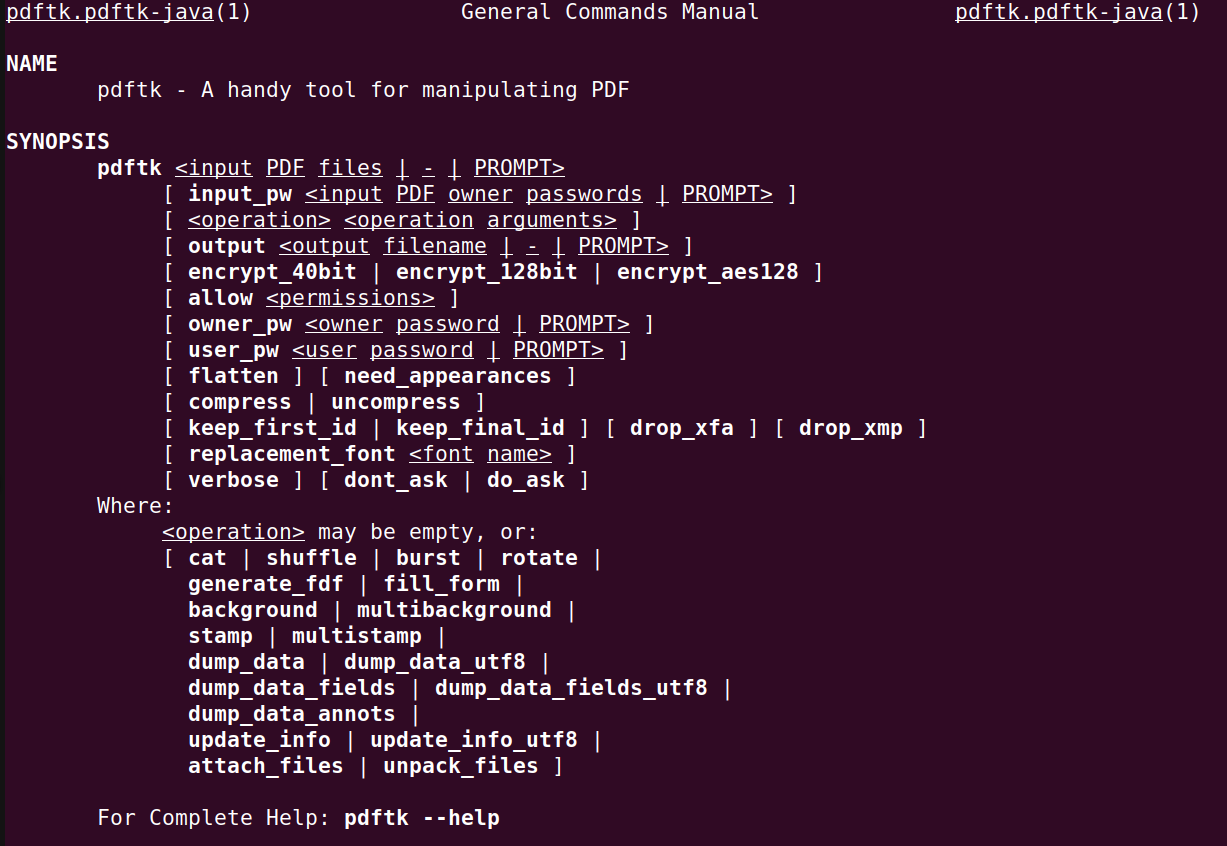
A bit of a deeper look at the man pages reveals that we need to dump the PDF meta data, modify this in a text editor, and then update the original PDF with the new metadata.
As an example, take Tsunami Propagation from a Finite Source (Carrier 2005). Once you’ve downloaded it, you can inspect the metadata contents with:
1
pdftk ~/Downloads/cmes.2005.010.113-2.pdf dump_data_utf8 output ~/Downloads/cmes.2005.utf
Opening ~/Downloads/cmes.2005.utf, you’ll see a number of fields, one of which
looks like the following:
1
2
3
InfoBegin
InfoKey: Title
InfoValue: main.dvi
If you change the InfoValue here in ~/Downloads/cmes.2005.utf to your
desired name, e.g.,
1
InfoValue: Carrier 2005: Tsunami Propagation from a Finite Source
and then call
1
pdftk ~/Downloads/cmes.2005.010.113-2.pdf update_info_utf8 ~/Downloads/cmes.2005.utf output ~/Downloads/cmes_updated.pdf
then your PDF now has the correct metadata and is ready for reading on an eReader!
Here is a permalink to a script that automates this update process for you. Here is a link to the same script on the main branch (in-case I ever update it). Here is the code pasted below for the script in case you don’t want to check out my github :)
1
2
3
4
5
6
7
8
9
10
11
12
13
14
15
16
17
18
19
20
21
22
23
24
25
26
27
28
29
30
31
32
33
34
35
36
37
38
39
40
41
42
43
44
45
46
47
48
49
50
51
52
53
54
55
56
57
58
59
60
61
62
63
64
65
66
67
68
69
70
71
72
73
74
75
76
77
78
79
80
81
82
83
84
85
86
87
88
89
90
91
92
93
94
95
96
97
98
99
100
#!/usr/bin/bash
trap 'echo "Error at ${LINENO}: ${BASH_COMMAND}" 2>&1' ERR
usage=$(cat << EOF
usage: $0 [-h] [-i] PDF NEW_TITLE

Update a PDF metadata with a NEW_TITLE and then output the updated PDF to a
default path '\${PDF}_updated'. Pass -i to update the PDF inplace.

positional arguments:
    PDF        Path to PDF to update.

    NEW_TITLE  The new metadata title for the PDF.

optional arguments:
    -h         Print a help message and exit.

    -i         Update the PDF inplace, thus removing any intermediate outputs.
EOF
)
inplace=0
while getopts "hi" flag
do
    case "${flag}" in
        h)  echo "${usage}"
            exit 0
            ;;
        i) inplace=1;;
        *)  echo "ERROR: unrecognized flags"
            echo "try $0 -h"
            exit 1
            ;;
    esac
done

# shift past options to get positionals
shift $(($OPTIND - 1))
n_positional_args=2
PDF=$1
NEW_TITLE=$2

# Script exits immediately on error and errors on uninitialized variables
# NOTE: when using grep, grep exits 1 on failure to pattern match and therefore
# '|| true' is needed when saving grep output to use in test expressions
set -eu

# Check if all positional arguments were provided
if [ $# -lt $n_positional_args ]
then
    echo "ERROR: Missing positional arguments!"
    echo "Try '$0 -h' for more information."
    exit 1
fi

# Verify positionals
if [[ ! -f "${PDF}" ]]
then
    echo "ERROR: PDF does not exist"
    echo "Got ${PDF}"
    exit 1
fi

# update title metadata
cur_metadata=$(pdftk "${PDF}" dump_data_utf8)
has_title_metadata=$(grep -n "InfoKey: Title" <<< "${cur_metadata}" || true)
if [[ -n "${has_title_metadata}" ]]
then
    # remove existing metadata
    lineno_infokey_title=$(grep --only-matching --perl-regexp \
        "\d*(?=:)" <<< "${has_title_metadata}")
    lineno_infobegin=$((lineno_infokey_title - 1))
    lineno_infovalue=$((lineno_infokey_title + 1))
    cur_metadata="$(printf '%s\n' "${cur_metadata}" | \
        sed "${lineno_infobegin}d;${lineno_infokey_title}d;${lineno_infovalue}d")"
fi

# Define the new metadata
title_metadata=$(cat << EOF
InfoBegin
InfoKey: Title
InfoValue: ${NEW_TITLE}
EOF
)
title_metadata="${title_metadata}"$'\n'
new_metadata="${title_metadata}${cur_metadata}"
output_pdf_path="$(dirname $(realpath ${PDF}))/updated_$(basename ${PDF})"
tmp_new_metdata="/tmp/new_metadata"
echo "${new_metadata}" > "${tmp_new_metdata}"

# update the pdf
pdftk "${PDF}" update_info_utf8 "${tmp_new_metdata}" output "${output_pdf_path}"

if [[ ${inplace} -eq 1 ]]
then
    rm "${PDF}"
    mv "${output_pdf_path}" "${PDF}"
    output_pdf_path="${PDF}"
fi

echo "output written to ${output_pdf_path}"
rm "${tmp_new_metdata}"